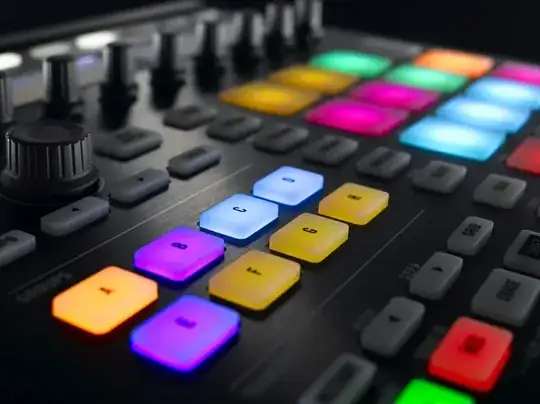
I need to know how to make the buttons in my blender project look the same as in this photo. Mine all look pale, even with the emission material. Is there anyway I can get my buttons like this?
Asked
Active
Viewed 9,898 times
30

GiantCowFilms
- 18,710
- 10
- 76
- 138

Borat Sagdiyev
- 543
- 2
- 8
- 10
-
I would reccomend a mixture of Translucency and Volume scatter – J Sargent Feb 18 '15 at 14:21
1 Answers
57
Cycles is a physically based render, and often the best approach is physical recreation.
Components:
- Light source
- Light cover
Light Source:
This would simply be an emission shader since it is literally a lightblub or LED. I took the button model, and scaled it down slightly on the X and Y axis. I then drastically scaled it on the z axis, and moved it down so the top of the source would to be flush with the of the panel that the button was set into.

Cover:
The cover allows light to pass through it, and is therefore Translucent so a simple translucent node will do the trick. It is also colored, which can be emulated by giving the translucent node a color:

The shape is also important: I added a small bevel to the edges to help see the look.
Final Image


Note
After some experimentation and some research, I discovered that using Sub Surface Scattering (SSS), and placing the light under the button instead of inside, would produce more accurate and better looking results. And it sure did... it also produced exponentially longer render times... even on GPU (using test build)!
Image with SSS:


The major difference is that the light source is under, not inside the button, and is scaled down on the X and Y axis. This method fixed the artifacts that were occurring on the corners, and is more technically accurate. I'd still use the first one, it is way way faster.


GiantCowFilms
- 18,710
- 10
- 76
- 138
-
That's amazing! Thank you so much. Also how do you get the text like that? – Borat Sagdiyev Feb 17 '15 at 01:06
-
3@BoratSagdiyev See the .blend file for the text. Also, if this answered your question, please hit the check mark to accept it, to let other know the question has been answered (I also get some points :D) – GiantCowFilms Feb 17 '15 at 01:07
-
1Nice you added the SSS correct solution, wanted to add this answer back then but forgot:) +1. – Jaroslav Jerryno Novotny Apr 27 '15 at 14:18
-
-
@Jerryno If you're going for accuracy then you should colour the emission instead of the SSS. – SchoolBoy Apr 12 '16 at 19:32
-
@SchoolBoy That is both correct and incorrect, it depends on how what you are creating was constructed. The effect can be achieved by coloring the internal light *or* the emission. If you mean't using emission for the surface that is incorrect, since these are created by putting a translucent rubber plastic button over a glowing light, which is simulated by SSS. – GiantCowFilms Apr 13 '16 at 00:41
-
No, you are correct, I meant colour the internal light source and not use an emission for the surface. And I suppose you are also right in saying that it depends on what you are recreating. It's just that in this case, looking at the buttons that aren't lit, it would be more accurate. – SchoolBoy Apr 13 '16 at 07:01