In a Plot (actually, a Graphics) command, I'd like to make the actual tick marks larger than they are, but I can't find an option to do that. Is there a way?
Asked
Active
Viewed 1.8k times


3 Answers
18
From belisarius' comment above:
Plot[Cos[x],
    {x, 0, 10},
    Ticks ->{{{Pi, 180°, .1}, {2 Pi, 360°, .1}, {3 Pi, 540°, .1}}, {-1, 1}}
]

-
1Note that you can also separately control the length of the two ends of each tick. E.g., in the
Ticksspecification above, replace.1by{.1,.05}to make the tick stick out twice as far above the x-axis as below the x-axis. – murray May 26 '12 at 15:24
13
Start with
pt = Plot[Sin[x], {x, 0, 2 Pi}]

Then, to increase the tick size, try the following:
c = 3; (* scale factor *)
tx = Map[MapAt[c # &, #, 3] &, Ticks /. AbsoluteOptions[pt, Ticks], {2}];
Show[pt, Ticks -> tx]
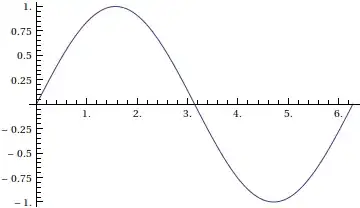
A similar thing can be done if you're using frames (Frame -> True) instead of axes; for that, you use FrameTicks instead of Ticks. See the docs for more details on those (as well as with AbsoluteOptions[]).

J. M.'s missing motivation
- 124,525
- 11
- 401
- 574
-
But this increased the number of tick marks and changed how labels are formatted (
6.instead of6). :-( – Szabolcs May 26 '12 at 13:05 -
Must be something screwy with
AbsoluteOptions[]. (It wasn't this way before.) I assumed it would get exactly the tick styles used. I'll need to think slightly more about this. – J. M.'s missing motivation May 26 '12 at 13:12 -
@Szabolcs: I can't test at the moment; could you try
Block[{test = Plot[Sin[x], {x, 0, 2 Pi}]}, GraphicsRow[{test, Show[test, First[AbsoluteOptions[test, Ticks]]]}]]and see what comes up? – J. M.'s missing motivation May 26 '12 at 13:14 -
1Still won't do what it's supposed to. Yes, you are right that there is something wrong with
AbsoluteOptions. In 3D it won't even return a tick-list, and in 3D tick sizing is simply broken! When you increase the ImageResolution in Rasterize, ticks don't scale linearly (they scale according to some weird functions...) This prevents me from doing proper antialiasing by upscaling then downscaling. Note how the ticks become near-invisible in the antialiased version in my link. It's because of this, not because lines get thin. – Szabolcs May 26 '12 at 13:20 -
1There's also something wrong with
FullGraphics: it will mess up both ticks and grid lines. I think the reason is that graphics are rendered by the Front End while FullGraphics is just an approximation of this rendering, done by the kernel. You can even read the source of FullGraphics, and find many relics from pre v6 times. What It may be that AbsoluteOptions is broken for the same reason. Why I don't understand is: why would it be necessary that ticks are generated by the front end, not the kernel. One guess is that tick spacing should depend on font sizes, which is know only to the FE – Szabolcs May 26 '12 at 13:23 -
Crap, that was precisely the alternative I was going to pursue... :( it will take me a while to think of how to fix this. – J. M.'s missing motivation May 26 '12 at 13:25
-
Unfortunately, at this point I think there is no way to fix this. There doesn't seem to be a completely reliable way to retrieve the automatically generated ticks (
Ticks -> Automatic). The usual advice is to use the CustomTicks package (also part of LevelScheme) to automate generating reasonable ticks, then it's easy to transform the tick specification later. – Szabolcs May 26 '12 at 13:30 -
In that case, I'll add a caveat to this answer later... – J. M.'s missing motivation May 26 '12 at 13:31
-
1I wrote another answer where I recommend custom ticks. As something related: I'd really like to have a meta question where people can post any package they use (packages they actually use in practice!!) as answers, and others who also use them could upvote those posts. It would be good for sharing one's own packages as well. Because of the voting and because of the requirement to vote for packages you use (not ones you found), this would be a completely different resource from MathSource and IMO quite useful. Thoughts? (In chat.) – Szabolcs May 26 '12 at 13:44
13
As others notes, if you manually give the ticks specification, it's easy to specify sizes for ticks. But then you need to generate all tick mark positions, including small and big marks, yourself.
Unfortunately, I have never found a way to reliably retrieve the automatically generated ticks specification. While @J.M.'s answer tries to do this, you'll notice that AbsoluteOptions doesn't return exactly the same ticks that were generated automatically.
An often recommended alternative is using the CustomTicks package (I learned about it from @Eli and @R.M.). It is also part of LevelScheme, so I recommend you install the latest version of LevelScheme instead. This package will spare you the pain of implementing your own tick-generator functions.
This is how you could use it:
<< LevelScheme`CustomTicks`

Plot[Sin[x], {x, 0, 10}, Ticks -> LinTicks]

Increase the tick sizes generated by the LinTicks functions:
SetOptions[LinTicks, MajorTickLength -> {0.02, 0}, MinorTickLength -> {0.013, 0}];
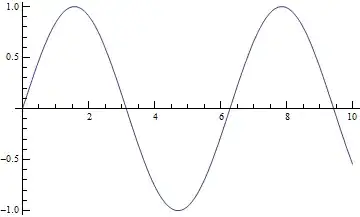
Plot[Sin[x], {x, 0, 10}, Ticks -> LinTicks]
Documentation for the package is here.

Szabolcs
- 234,956
- 30
- 623
- 1,263
-
While I just started using a variant of Belisarius' answer above, this looks like a great package. Since in my application I want irregular user-specified ticks, I think this should exactly do the trick. Thanks. – rogerl May 26 '12 at 20:13
-
Downvoters: If you don't explain what's wrong with this answer, I won't be able to correct it. – Szabolcs May 02 '16 at 13:54
-
@Szabolcs, this does not work when I set
Frame->True. How can I use this package to set the ticks lengths when using frames? – Miguel Dec 26 '17 at 13:26 -
-
LevelSchemehas been obsoleted bySciDrawwhich, unfortunately, is now old and causes various name conflicts with Mathematica 11.3. – murray May 31 '18 at 18:53 -
@murray There is only a single name conflict, but it does not cause any issues (except that the
BoundingRegionfunction of SciDraw will not work). The CustomTicks package can be loaded independently from the rest of SciDraw. – Szabolcs May 31 '18 at 22:01
Ticks(FrameTicksif you're using frames instead of axes)? Check the tick mark option settings. – J. M.'s missing motivation May 25 '12 at 18:54FrameTicks, but unfortunately that does not seem to work unless I'm using frames (which I cannot in this application). – rogerl May 25 '12 at 18:58