13

How do I get the colors to match the plot theme when I use a PlotLegend that is separate to the plots? I have had a look at How to access new colour schemes in version 10? but can't seem to find what I need. Here is some data and an array of plots.

Initialization

data1 = 
 {Table[{x, Sin[x]}, {x, 0, 2 π, 0.1}], 
  Table[{x, Sin[2 x]}, {x, 0, 2 π, 0.1}], 
  Table[{x, Sin[3 x]}, {x, 0, 2 π, 0.1}]};

data2 = 
 {Table[{x, BesselJ[1, x]}, {x, 0, 2 π, 0.1}], 
  Table[{x, BesselJ[2, 2 x]}, {x, 0, 2 π, 0.1}], 
  Table[{x, BesselJ[3, 3 x]}, {x, 0, 2 π, 0.1}]};

data3 = 
 {Table[{x, BesselJ[4, x]}, {x, 0, 2 π, 0.1}], 
  Table[{x, BesselJ[5, 2 x]}, {x, 0, 2 π, 0.1}], 
  Table[{x, BesselJ[6, 3 x]}, {x, 0, 2 π, 0.1}]};

data4 = 
 {Table[{x, BesselJ[7, x]}, {x, 0, 2 π, 0.1}], 
  Table[{x, BesselJ[8, 2 x]}, {x, 0, 2 π, 0.1}], 
  Table[{x, BesselJ[9, 3 x]}, {x, 0, 2 π, 0.1}]};

opts = 
 {Frame -> True, Axes -> False, 
  FrameLabel -> {"Time/s", "Pressure/Pa"}, ImageSize -> 280, 
  BaseStyle -> {FontFamily -> "Times", FontSize -> 12}, 
  PlotTheme -> "Scientific"};

Result

Column[
  {Row[
    {Style["Data from experiment 5B", FontFamily -> "Times", 
     FontSize -> 12]}, Alignment -> Center, ImageSize -> (4 + 4 + 0.5) 72],
   Row[
    {ListLinePlot[data1, opts], Spacer[0.5 72], ListLinePlot[data2, opts]}],
   Row[
    {ListLinePlot[data3, opts], Spacer[0.5 72], ListLinePlot[data4, opts]}],
   Row[
    {LineLegend[{Red, Blue, Green},
    {"x-direction", "y-direction ", "z-direction"},
    LegendLayout -> "Row", LabelStyle -> {FontFamily -> "Times", FontSize -> 12}]}, 
   Alignment -> Center, ImageSize -> (4 + 4 + 0.5) 72]}
 ]

Mathematica graphics

My problem is that I have the wrong colors in the caption. How do I pick up the colors of the PlotTheme? I am using rows and columns rather than GraphicsGrid because I need to use the "Get Coordinates" feature using the right mouse click. Graphics grid does not permit this for individual graphs.

Hugh
  • 16,387
  • 3
  • 31
  • 83
  • Add PlotStyle -> {Red, Blue, Green} to your opts variable. (Or choose whatever colors you want, so long as they agree with the choice in the LineLegend.) – bill s Nov 29 '14 at 23:53

3 Answers3

16

Use

colors=(("DefaultPlotStyle"/.(Method /. 
     Charting`ResolvePlotTheme["Scientific" ,  ListLinePlot]))/. Directive[x_,__]:>x)

to get the colors used in the "Scientific" plot theme. Then use colors as the first argument of LineLegend:

Column[{
 Row[{Style["Data from experiment 5B", FontFamily -> "Times", 
 FontSize -> 12]}, Alignment -> Center, 
 ImageSize -> (4 + 4 + 0.5) 72],
 Row[{ListLinePlot[data1, opts], Spacer[0.5 72], 
 ListLinePlot[data2, opts]}],
 Row[{ListLinePlot[data3, opts], Spacer[0.5 72], 
ListLinePlot[data4, opts]}],
 Row[{LineLegend[colors, {"x-direction", "y-direction ", 
  "z-direction"}, LegendLayout -> "Row", 
 LabelStyle -> {FontFamily -> "Times", FontSize -> 12}]}, 
  Alignment -> Center, ImageSize -> (4 + 4 + 0.5) 72]
  }]

enter image description here

kglr
  • 394,356
  • 18
  • 477
  • 896
6

This is not another answer but rather an extension of kguler's correct response. Further issues are also identified. In order to help use kguler's answer I have made a function which may be useful to others.

ClearAll[plotColors];
plotColors::usage = 
 "plotColors[plotType,plotTheme] gives a list of the colors used in \
a plot when several curves are drawn. Here plotType is, for example, \
Plot or ListLogPlot while plotTheme may be \"Scientific\", \
\"Classic\" etc.";

plotColors[plotType_, plotTheme_] := 
 ("DefaultPlotStyle" /. (Method /. 
   Charting`ResolvePlotTheme[plotTheme, plotType])) /. Directive[x_, __] :> x

This function gives a nice list of colors when implemented, for example

plotColors[Plot, "Scientific"]
plotColors[ListLogPlot, "Scientific"]
plotColors[ListLinePlot, "Classic"]

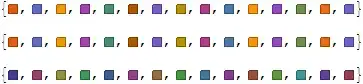
Giving

*Mathematica* graphics

Another nice feature is that all the colors are listed but there is no need to reduce the number to that needed. This is done automatically.

For some plots my function does not work. For example for ParametricPlot there is both a DefaultBoundaryStyle and a DefaultPlotStyle covering the cases where a parametric region is plotted as an alternative to a curve. This may be discovered by typing

Charting`ResolvePlotTheme["Scientific", ParametricPlot]

Which gives

Mathematica graphics

Clearly Charting`ResolvePlotTheme is a function that needs to be explored.

xyz
  • 605
  • 4
  • 38
  • 117
Hugh
  • 16,387
  • 3
  • 31
  • 83
6

I propose using the lower-level System`PlotThemeDump`resolvePlotTheme to find the information you need. This reveals the color scheme number itself rather than resolving to a list of Directives.

You must give the plot function name as a String. The key you are looking for is "DefaultColor":

Themes`ThemeRules;  (* preload PlotThemes subsystem *)

"DefaultColor" /. 
   Last /@ System`PlotThemeDump`resolvePlotTheme["Scientific", "ListLinePlot"]
108

That is all you need in your LineLegend to get the color scheme you want:

LineLegend[108, {"x-direction", "y-direction ", "z-direction"},
 LegendLayout -> "Row", LabelStyle -> {FontFamily -> "Times", FontSize -> 12}]

enter image description here

Mr.Wizard
  • 271,378
  • 34
  • 587
  • 1,371
  • BTW, I would like to know that how do you know the internal auxiliary functions like System`PlotThemeDump`resolvePlotTheme, Macros`SetArgumentCount, Graphics`ArrayPlotDump`Private`hiddenOptions. THX:-) – xyz Jul 25 '15 at 12:23
  • 4
    @ShutaoTang In many cases it took a lot of tedious digging through Trace results, but more recently often from an easier but still at times complicated task of reading top-level definitions with Spelunk or PrintDefinitions; see What is the most convenient way to read definitions of in-memory symbols when we don't have the source files? (Spelunking tools) – Mr.Wizard Jul 25 '15 at 12:29
  • @Shutao, to start you off on the wonderful world of "spelunking", look at the result of Contexts[]. You'll see a bunch of other contexts in there, each context having its own set. Then, you just try things out... – J. M.'s missing motivation Jul 25 '15 at 12:29
  • 3
    @ShutaoTang When you're feeling lucky, things like ? *`*PlotTheme* sometimes strike gold. Note though that some functions aren't loaded until needed. So you should execute a dummy command, in this case a plotting command like Plot[1, {x, 0, 1}], to search the full functionality. – Michael E2 Jul 25 '15 at 13:08
  • 3
    @Mr.Wizard In re the last point in my comment, the same applies to System`PlotThemeDump`resolvePlotTheme["Scientific", "ListLinePlot"], which won't work until a plotting command has loaded resolvePlotTheme. – Michael E2 Jul 25 '15 at 13:11
  • @MichaelE2 (and J.M.) I don't favor that approach. Yes, at times its the only way to find something, and you just have to go out on a limb and try it as I did for (88790), but often the only way I can figure out what Symbol is or does is to see it used somewhere in a Trace or internal definition. I think one could waste a great deal of time trying to browse Symbol names directly. – Mr.Wizard Jul 25 '15 at 13:13
  • @MichaelE2 Regarding preloading, I've forgotten to include that before. Thanks. Some of the stuff I load at start-up causes a limited amount of preloading so sometimes I don't notice this even if I start in an otherwise fresh kernel. – Mr.Wizard Jul 25 '15 at 13:14
  • You're welcome. - Re spelunking, I agree with you about the value of Trace, but it too can use a lot of time. Knowing what to put in the second argument can be helpful. Certainly some ? *`*foo* searches result in a large number of fruitless dead-ends. Good judgment, although not always easy to exercise, can allow you "to play your stones lightly," as they say in Go. – Michael E2 Jul 25 '15 at 13:27
  • @Mr.Wizard Thank you for revisiting my old question. You have simplified and added more. Many thanks. – Hugh Jul 25 '15 at 22:00