My approach is based on the basic Frenet Trihedron formulas (which were implemented in v.10) and also some basic geometric transformations (matrix rotation and translation).
It can be applied to extrude any 2D polygon.
1. Choice of the path
I modified a little bit the OP's path for the sake of keeping the 3D graphics simple to view.
path[u_] := {Sin[u], Cos[u], u/2};

{uStart, uEnd} = {0, 2};
It corresponds to a portion of a helix
gPath = ParametricPlot3D[path[u], {u, uStart - 0.2, uEnd + 0.2},
PlotStyle -> Thickness[0.02]]

2. Choice of the Polygon
This is the OP's polygon :
list = {{0, 0}, {0, 15}, {7, 13}, {2, 13}, {2, 5}, {5, 5}, {5, 3}, {2,3}, {2,0}};
which needs to be scaled down in order to fit the overall size of the path. For example :
scale = 0.05;
transxy = {-0.05, -0.25};
(nlist = (Plus[transxy, #] & /@ (scale*list))) //
 Graphics[{Black, Polygon[#]}, Axes -> True, AxesOrigin -> {0, 0}] &
Notice the arbitrary translation (transxy) which lets you also choose where exactly the path line will pass through the polygon (we defined here the axes origin {0,0} to be always this point). (Of course, one could also add a local rotation of the polygon in the plane if needed).

3. Transformation Definitions (Rotation+Translation)
To extrude the polygon along the path, we need to rotate the 2D polygon in the 3D space such that its (x,y) axes match respectively the (normal, binormal) axes of the frenet trihedron along the curve. The z axis will have to match the tangent of the curve (in order this tangent to be perpendicular to the polygon surface as requested by the OP). We also need to translate the rotated polygon to its corresponding position along the path.
All this can be simply achieved with :
frenet[u_] = FrenetSerretSystem[path[u], u][[2]];

transform[u_] := Composition[TranslationTransform[path[u]],
 FindGeometricTransform[frenet[u], {{0, 0, 1}, {1, 0, 0}, {0, 1, 0}}][[2]]]
4. Extruding Points
(* Here you choose how many extruded polygons you want along the given path *)
nint = 50;

allpoints =
 Table[transform[u] /@ (nlist /. {x_, y_} -> {x, y, 0}),
{u, uStart, uEnd, (uEnd - uStart)/nint}];
Let's check :
Graphics3D[{Point /@ allpoints, Polygon@allpoints[[1]]}]

5. Drawing the surface
That's almost it ... We "just" need to draw some surface passing through the "extruded" points.
5.1 The hard way
The idea here is simply to draw polygons through every 4 neighbour points.
pPoly = Join[allpoints, List /@ allpoints[[All, 1]], 2] //
   Table[Polygon@Extract[#, { {i, j}, {i, j + 1}, {i + 1, j + 1}, {i + 1, j}}],
 {i, 1, Length@# - 1}, {j, 1, Length@#[[1]] - 1}] &;
pPolyEnds = allpoints // {First@#, Last@#} & // Polygon;
pEdges = Line[Transpose@allpoints];
pExtr = {RGBColor[0.8, 0.8, 0.8], {EdgeForm[],
    pPoly}, {EdgeForm[Black], pPolyEnds}, {Black, pEdges}};
The final result :
gTNB = Graphics3D@Map[Arrow@{path[0.], path[0.] + #} &, frenet[0.]];

Show[{Graphics3D@pExtr, gPath, gTNB}, Lighting -> "Neutral",
 Axes -> True]

In particular, you can check here that 1/ the path (in blue) pass through the chosen point inside the polygon (see the section Choice of the polygon), and 2/ that the polygon surface is perpendicular to tangent and that the (x,y) axes of the polygon matches the normal and binormal directions.
5.2 The Spline Way
You can attempt to draw directly the surface passing through all the "extruded" points with the function BSplineSurface:
Graphics3D[{FaceForm[GrayLevel[0.8]],
  BSplineSurface[allpoints, SplineDegree -> 1]},
 Lighting -> "Neutral"]

However, if you look carefully there is a problem because some edges are not anymore sharp as they should be. If you zoom in :
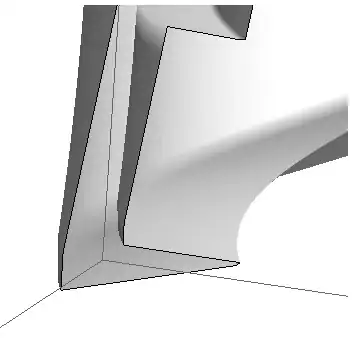
The workaround is simply to break the whole surface into smaller parts (which solves also the problem to draw solid lines along the edges of the polygon).
Graphics3D[{FaceForm[GrayLevel[0.8]],
  allpoints // {First@#, Last@#} & // Polygon,
  BSplineSurface[#, SplineDegree -> 1] & /@
   Partition[Transpose@Join[allpoints, List /@ allpoints[[All, 1]], 2], 2, 1]},
  Lighting -> "Neutral"]

You can have a much smoother 3D rendering of the surface if you use SplineDegree->2 (it is safe to do so because we have broken the whole surface into smaller smooth parts) :
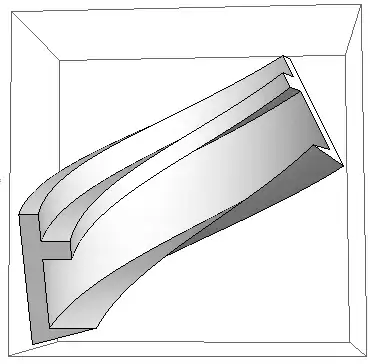
This last graphic shows that one could optimize nint, the number of extruded points, in order to get the smoothest surface with the less number of these points.
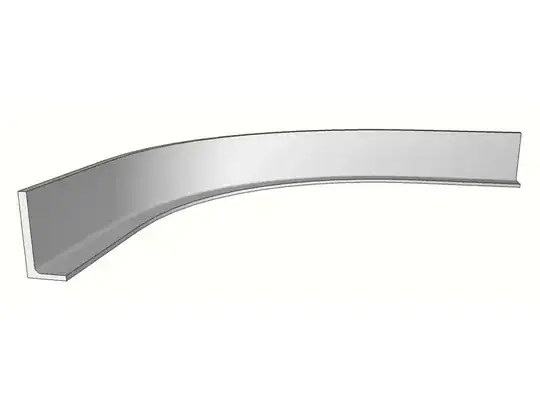


csis just the coordinates of the polygon being extruded. Forcsuse youlist. I'd suggest tryingcs = list/50because your polygon is way too big for the path you have. See