I am wondering why there is a difference in the results from evaluating the two expressions, which differ only in the order of the arguments given to Show.
When I run
Animate[Show[spring[t], bob[t], traj], {t, 0, 20}]
the animation is different from
Animate[Show[traj, spring[t], bob[t]], {t, 0, 20}]
Parts of the plot get cut off, depending on the order of the arguments.


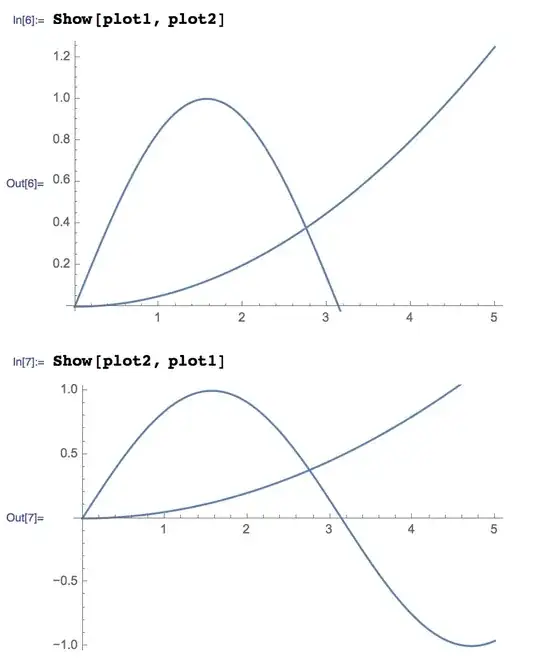


Showtakes options from the first argument which is different for those cases. – Kuba Mar 22 '14 at 22:16Show[g1, g2,...]orShow[{g1, g2,...}]concatenates the graphics primitives in thegi, effectively overlaying the graphics." And: "The lists of non-default options in thegiare concatenated." – Michael E2 Mar 22 '14 at 23:39Showdoes not care about options ingiother thang1(AFAIK). – Alexey Popkov Mar 23 '14 at 01:33p3 = Show[ p1 = Plot[x^2, {x, 0, 2}], p2 = Plot[2 Sin[x], {x, 0, 3}, ImageMargins -> 100] ]; AbsoluteOptions[p1]The first occurrence of an option overrides later ones, which are deleted.ImageMarginsis set to0.inp1, which would causeImageMargins -> 100to be ignored, IF that is how it works. In effect, then, what you say is true, too, since the first plot seems to set every possible option, or at least the documented ones. In any case, the doc. is at least misleading. – Michael E2 Mar 23 '14 at 01:55Show: according to the citation, it must ignore default option values in thegiwhen concatenating options. – Alexey Popkov Mar 23 '14 at 02:00Show. It is worth to fill a bug report on this issue. – Alexey Popkov Mar 23 '14 at 02:46